Showing posts with label Running. Show all posts

Thursday, January 14, 2016

Add a run session with the Nike running app

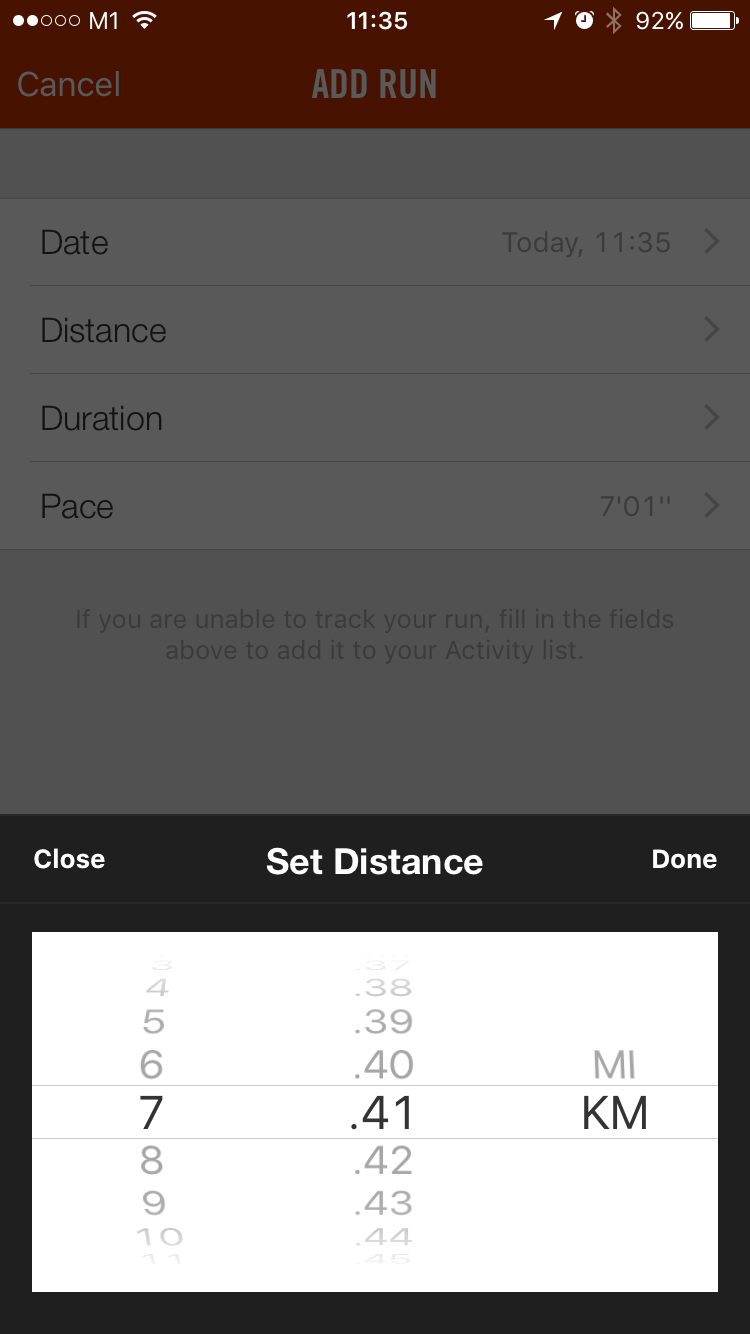
This might be old news - Now Nike allow us to add a run to the Nike+ website using the running app on Android and iPhone. Before this, we can only manually add a run through a 3rd party website.

Let us quickly go through how do I add my distance, pace and duration using my ios app on my iPhone. It should work about the same way if you own an Android phone.

1) Sign in to your Nike+ app and tap on activity

2) Tap on the + icon on the top right corner of the screen

3) It will bring you to the screen below where everything is pretty straight forward

4) Manually set distance of your run


5) Manually set duration of your run


6) Manually set pace of your run

That's it, I wish I can manually key in my fuel too!

Friday, August 29, 2014

Help! I can't share my Nike plus runs on facebook

Many runners cannot get their Nike+ runs to share on their Facebook. Even though the running app says it shared but upon checking, there is still no post of the run yet. Some also complained that the FB icon on the Nike website is greyed out while the Twitter icon works fine.

The solution is simple:
1) Log into the Nike+ website
2) Click on your run that you want to share
3) Click "Make Private" beside the social icons
4) Walla! The Facebook icon should not be grey out now
5) Now click on the FB icon and you can share now


Notice that the FB icon is greyed out, click on the make private icon
Yes! Make it private, duh...yes..Nike's "private" is actually making it able for sharing

Now you can share your runs, cheers!

Tuesday, August 19, 2014

What!? You can draw pictures with Nike running app


Claire Wyckoff from San Francisco did just that and it wasn't easy. It is really hard to plot where you are running and it takes a lot of planning before the run, studying the map. Nike should create some new trophies and achievements for drawing something with our runs, don't you think so?

There are also many requests from her family and friends, excerpts taken from her tumblr blog:

My sister asked me to run-draw her name, but we did her one better: we ran a stripper on a pole. It was 4.5 miles but well worth it for family.

"Hey guys ran an alien from the 1978 Atari game Space Invaders. David said I should make the post funny but I got nothing. When I’m sad and I need a chuckle I think about Kim Kardashian with the shits."

Wednesday, April 23, 2014

Add a run on the new Nike+ Running App

Nike released the new iOS update for the running app and you can add a run by yourself officially now! (Nike knows: If you can't fight it, join it)
I have not tried this personally but from what I see, it looks quite simple.

You can manually add a run completed within the current year to your Nike+ account using the Nike+ Running App on any compatible iOS device. Here's how:

Tap the menu icon in the upper left.
Tap "Activity".
Tap the "+" in the upper right.
Add Activity icon in upper right of app screen
Tap the field to enter your data
Tap "Done."
Add Activity screen showing fields for Date, Distance, Duration and Pace

    Add Activity screen showing fields for Date, Distance, Duration and Pace
    NOTE: Pace will default to the average pace of all your previously synced workouts. When you enter distance and/or duration, your pace will adjust accordingly.
    After entering your run data, tap "DONE" at the bottom of the screen.
    Tag optional information with how you felt, terrain, and shoes worn. You can also share your activity on social media.
    App screen showing optional tagging of how you felt along with a flat line graph of your run
    Manually added runs will appear as a flat line in the map area, with time, calories, pace, and NikeFuel stats based on the information you provided.

    Thursday, October 17, 2013

    How Nike+ Top Routes are created


    Many people have been asking me how the Nike plus top routes are created and how they can create one so that they can earn the speed demon or local legend trophies.

    So I went ahead and ask the same exact question to the Nike support dudes:

    Q: How are top routes created on the Nike+ places, I'm curious how some people are able to match their runs to certain routes (like the map below "Bucktown to Lincoln park" for example). Do these people have a special status or am I missing something? What are the hot routes and how are they generated?

    A: To clarify, some routes have been identified as Top Routes by our team. If you have a Nike+ device that uses a GPS signal to record your metrics, one of these Top Routes can be run and you can attribute the workout to this specific path. This feature is not accessible at this time however. Stay tuned for updates.


    So to summarize, Nike choose what's in and what's not for you. The routes that you can create, is for your own viewing only. Only Nike can create a top route in the Nike+ places.
    Guess we will have to wait again for their "not so often" updates to the Nike map.

    Thursday, June 28, 2012

    DIY Nike+ Sensor Pouch

    Today I came across a video by "nikeplusrunners" who came up with an easy and free way to use the Nike+ sensor without using Nike shoes! I've tried running using this method and my Nike GPS sportwatch has no problem detecting it during my entire run.


    Step 1: Place your Nike sensor into a platic bag or zipper bag


    Step 2: Slot it all the way in between the tounge of your shoe and the shoe laces.

    You won't even feel it during your run. It's that easy! And it's water resistant too! There's no need for any costly sensor pouches or drilling your shoes...

    Sunday, June 24, 2012

    Help! Where can I find the challenges page in the new website?


    Question:
    I love your new Nike+ website but where have all my challenges gone? I can't find my exisiting challenges. Can I still keep track of the progress of the challenges I am in?

    From Nike+ Running Faqs:
    Challenges are being revamped with new ways to challenge and be challenged by any Nike+ member. Runners will be able to challenge their Nike+ friends with miles or NikeFuel-based challenges, as well as 1:1 and group challenges. Our new Challenge feature will be launched in Fall 2012.

    Are you in an existing Challenge on our current site that extends past May 31? Not to worry - you will still be able to view your progress and see your Challenge leaderboards while we build the new Challenges system. Shortly after the new site launches in June, Challenge participants will be able to view a leaderboard of their existing Challenges. The Challenge leader boards will update in real time, and will include individual and team leader board views. You will not be able to edit, join, invite a new member, create a new challenge, delete an existing challenge or trash talk. But you will be able to keep your current Challenges going while we build our new version, which we hope gives you that extra motivation and fun that Nike+ brings.  

    Please note there will be a short amount of time after the new site launches where you will not be able to see your current Challenges. Your data will not be lost. We are still tracking every run and keeping the leader boards intact, so keep getting those runs in!  

    Help! The new Nike Running App is not accurate

    Question: I just downloaded your Nike running app on my android phone and ran over 8 miles but it showed only 5.6 miles.

    Update from Nike Running:
    Our GPS locking issue with the Nike+ Running App for iPhone and Android has been resolved. We're back up and running, and now so are you. Download the update here and get back to doing what you love.

    On iTunes for iPhone: http://gonike.me/NikeRunning
    On Google Play for Android: http://gonike.me/NikeRunningRobot

    Thursday, June 21, 2012

    Finally! Nike+ Running in on Android!


    Nike+ Running now available for Android, iOS gets version 4.0 update with new interface

    The most popular running app is now available on Android, for free!

    Map your runs, track your progress and get the motivation you need to reach your goals. No sensor or additional products needed, just grab your phone and go.

    - From the trail to the treadmill, your phone's GPS and accelerometer accurately record your distance, pace, and time. In-run audio feedback lets you know these metrics at every mile, so you can stay focused on your run.

    - Get in-ear cheers from your friends on Facebook when you broadcast that you’ve started a run. Tag the friends you ran with and share a map of your route with friends and family.

    - Have a song that gets you pumped? Set up PowerSongs to give yourself a boost with the tap of a button.

    - Our Run Summary makes it easy to view your route and track how you felt, the terrain you tackled, and the weather you endured.

    - Rotate your phone while viewing the Run Summary to see the breakdown of your run into mile splits.

    - See how your last run stacks up against your previous seven, and get fresh insights based on your latest activity every time you come back to the app.

    - Swipe upwards on the Home Screen to view your next moves. From picking your PowerSongs to challenging one of your personal bests, there’s always something to make your running experience better than before.

    - Visualize all your runs side-by-side and see your progress in a bar graph history view.

    - Syncing your run to the Nikeplus.com website allows you to view your maps on a larger screen, set a new goal, and find Nike+ Top Routes in your area. Check it out.

    - There’s even shoe tagging. Type in the name of your running shoes to track the distance they’re logging and see when it’s time to lace up a new pair. You’re never done running, but your shoes might be.

    - Need extra motivation? Add a widget to your phone’s home screen to show when you ran last, display your total mileage, and for even quicker access into a run.

    - Some features such as Share Run and Cheer Me On require users to be connected to a wireless network for full functionality. Please note that continued use of GPS running in the background could dramatically decrease battery life.

    You can download for FREE now on Android and iOS!


    Tuesday, June 19, 2012

    How Do I Manually Add A Run To The Nike+ Website?


    Question:

    I have 4 run/walks from over the past 5 months that are not showing on the Nike+ site. I just found out the USB from the Nike+ device never connected as I thought. Can I manually add my runs to this site?

    Solution #1:

    According to the Nike, it is not possible to manually add or edit the runs but you still follow these steps to have the Nike support help you add in your runs:

    1) Go to Nike Support Facebook page http://www.facebook.com/nikerunning/app_265092000187882
    2) Post a question to the Nike support page, asking them to add your run into your profile.

    Please include your:
    • Nike+ screen name(case-sensitive)
    • date of workout
    • distance of workout

    Solution #2:
    Check out http://funplus.truehipster.com/

    Sunday, June 10, 2012

    My Personal Best Records Are Way Off!

    Help! In the new Nike+ running website, my personal bests are way off! I used to have 895 calories burned as the best record, but the website saved it as 403 which is my latest run. The same goes to my 5K and furthest run records.

    Answer: From Nike Support - We're aware that some users are having a similar experience and we're working on getting it resolved as soon as possible.

    How is Nike+ Heat Map Calculated?

    Nike plus heat map question: how is the Heat Map in Nike+ Maps calculated? Is it after a number of runs or must there be several different devices/users clocking the GPS data before it turns orange? Thanks for reading!

    Answer: Nike calcuates the number of users running the same route. So the more number of runners who have synced their GPS data of that particular area/route the more red the "heat" will show on the map.

    Friday, June 8, 2012

    How do I change from miles to kilometers

    Help! I can't seemed to be able to change my site preferences in the new Nike+ website, I want to change my settings from displaying miles to kilometers, pounds to kilograms and MM/DD/YY to DD/MM/YY.

    Follow these Steps:
    1) Click on "My Account" on your Nike Plus Screen
    2) Under "My Profile", please be sure to clear and delete any zip codes, country, states and click "save"
    3) Click on "Site Preferences" and swap to metrics and you will be able to save now.

    Alternate solution (if the above steps does not work for you) from Mr Anonymous from the comments:

    "To view your activities in km and km/h, just change the countrystettings at the bottom left of the nike+ site (just scroll down). Press English and then select English -> Europe. Automaticly your activities will be displayed in km. Don't try to change the site preferences, it doesn't work. I've been frustrated since 1,5 month and now I can finally see my activities in km, just by changing the countrysettings. Simple solution which Nike doesn't seem to know themselves!"

    Clear and delete any zip codes if you have one

    Change to metrics and hit save

    Solution as of June 2012

    Alternate solution #2 (if the above steps does not work for you) from Gunnar Birk Kristiansen's comment:

    In order to change my Nike+ website from miles to kilometers, I had to put an extra digit into the ZIP code field to make it work. In my case I changed 2400 to 24000 - voila!
    Solution as of August 2014

    How Do I Delete A Run In The New Nike+ Website

    How do you delete a recorded run in the Nike+ running website?

    1) Click on any runs you want to delete
    2) Click on the round settings icon (right beside the twitter and facebook icon) on the top right corner of graph
    3) Select "Delete This Run"