Showing posts with label Nike Fuelband. Show all posts
Tuesday, September 1, 2015
500 days fuel streak
Time to celebrate, today I hit the 500 days of meeting my Nike fuel goal! That is 1.36895463 years according to Google.
Sunday, April 12, 2015
Yes! Nike+ fuel app could replace the fuelband
After writing the post "Nike+ Move app does not replace FuelBand", one kind reader - Rafiq Sarlie pointed to me that the new Nike+ fuel app (formerly Nike+ fuelband app) can indeed calculate fuel by its own.
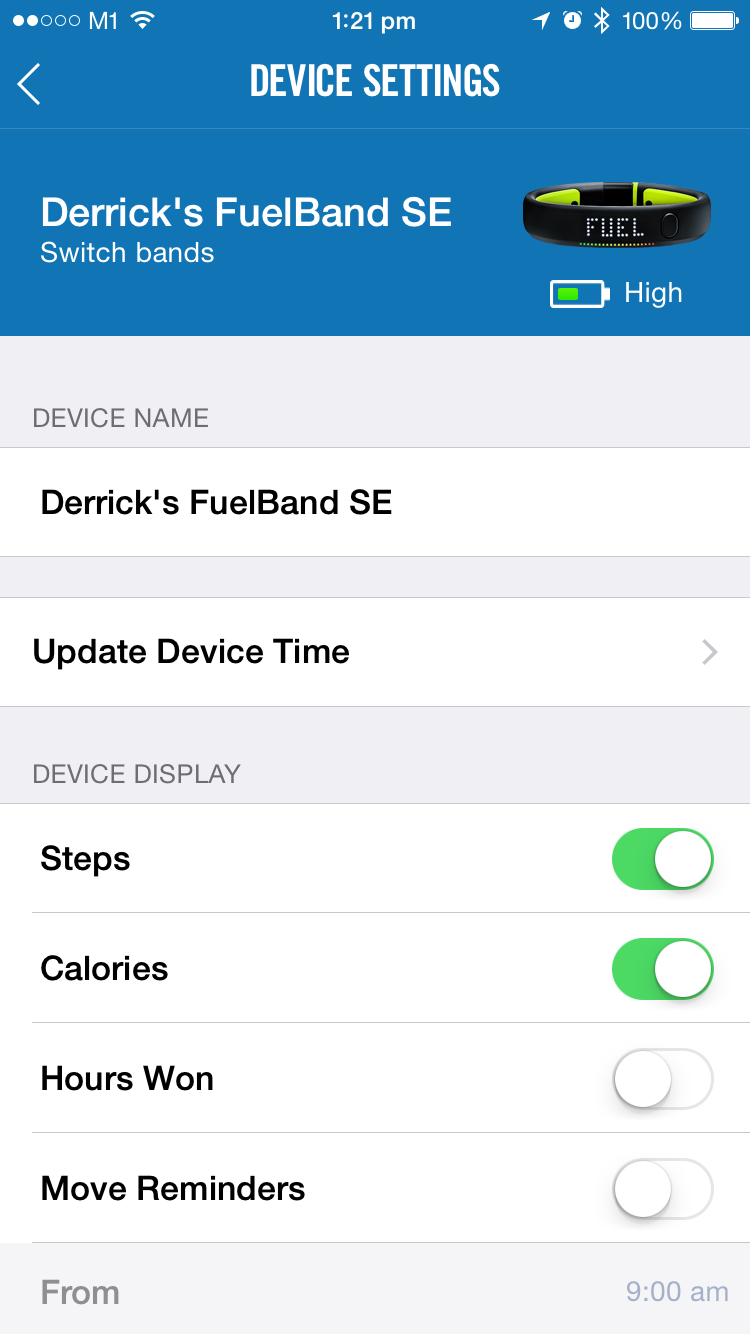
If you want to track Fuel in the Fuel App without a FuelBand, you will need to enable iPhone Tracking. To do this, you will need to
1) navigate to Settings within the app
2) then click Device Selection
3) click iPhone Tracking to turn on this feature
Now you do not have wear that band on your wrist 24/7!
Enjoy!
If you want to track Fuel in the Fuel App without a FuelBand, you will need to enable iPhone Tracking. To do this, you will need to
1) navigate to Settings within the app
2) then click Device Selection
3) click iPhone Tracking to turn on this feature
Now you do not have wear that band on your wrist 24/7!
Enjoy!
| Click switch bands on the top under device settings |
| switch between the iPhone and your fuelband |
Labels:
Nike Fuelband,
Nike Fuelband SE,
Nike+ Fuel app
Thursday, April 9, 2015
Nike+ Move app does not replace Fuelband
I have just switched to using iPhone after hanging on to my android for 6 years and I am looking forward to using the Nike+ Move app (which is exclusive to iphone 5 and up), thinking I could finally ditch my smelly fuelband and wear a proper watch..I am in for a surprise - The fuel earned on Nike move app is solely for viewing purpose only and not uploaded to the Nike+ website, this is what Nike said:
DOES NIKEFUEL EARNED USING THE NIKE+ MOVE APP APPEAR IN ANY OTHER PLACES?
The NikeFuel earned using the Nike+ Move app appears only within the Nike+ Move app. The Nike+ Move app is a stand-alone, introductory experience on the iPhone 5S announced by Apple
That means I have to keep wearing the fuelband for now to keep earning those trophies...
Some more information about the difference between the fuelband and the move app:
The Nike+ Move App is an introductory experience on iPhone 5S, while the Nike+ FuelBand SE and Nike+ FuelBand App offer a complete, all day Nike+ experience that works on most iOS devices.
Specifically, the Nike+ FuelBand SE can be worn places you wouldn’t take your phone, be on your wrist throughout the day (providing the most representative view of your body movements) and be used on its own or with a variety of iOS devices. The Nike+ FuelBand syncs with the Nike+ FuelBand App and Nikeplus.com so you can see your progress, earn achievements, plus share and compete with your friends.
Tuesday, January 6, 2015
How to fix error returned from Nike+
For the past few weeks, whenever I plug in the fuelband SE to my PC, Nike+ connect displays "Error returned from nike+"
My solution: Factory reset
Note: Performing a factory reset will erase any unsynced data from your device.
Click "Settings".
Click "Factory Reset" in the lower left corner.
Do you have other alternative solutions? Share with me in the comments below!
My solution: Factory reset
Note: Performing a factory reset will erase any unsynced data from your device.
Click "Settings".
Click "Factory Reset" in the lower left corner.
Do you have other alternative solutions? Share with me in the comments below!
Thursday, December 18, 2014
Nike Fuel New Feature
It's about time, people have been complaining about having double counts of fuel earned when they go running or a workout. Now Nike has a new feature for calculating Nike Fuel taking only the highest value of your workouts.
"If you track activity using more than one device simultaneously, only the highest value will be added to your Nike+ FuelBand lifetime total." - Nike Website
Wednesday, April 23, 2014
Nike Fuelband Error Codes
These solutions was posted a few weeks by Nike, I thought it would be better if they are all in a page.
Please click the appropriate link below to view troubleshooting steps for the error you've encountered.
- Code 34: Your Nike+ device is in an unusable state, possibly due to an unsuccessful firmware update.
- Code 41: Sorry, unable to connect to Nikeplus.com.
- Code 45: Sorry, unable to connect to Nikeplus.com.
- Code 68: We’re sorry, we can’t update your FuelBand firmware at this time.
- Code 91: Device firmware not compatible with operating system.
- Code 92: Nike+ Connect is no longer supported on your computer's operating system.
- Codes 801, 802, 803, and 804: We may have found an issue with your device.
Wednesday, October 16, 2013
Nike reveals the new FuelBand SE
The new Nike+ FuelBand SE was revealed during the NikeFuel Forum. The new Nike+ FuelBand opens up more ways to connect with your friends so you can keep each other going. Create or join a group and go after a goal together. Share your progress, cheer each other on and compete for top slot on the leaderboard.
The new Nike+ FuelBand SE now tracks not only how much, but also how often and how intensely you move. And it gives you real-time feedback, move reminders and insights to help you move more and move better.
- Launches November 6 for $149
- FuelBand SE remains an iOS-only accessory. (as always)
- Real time feedback, insights and reminders
- Claimed to be waterproof
- Bluetooth 4.0
- More colors to choose from
- Double tap to reveal time
- Bigger battery capacity
- No heart rate monitoring
Features of the new FuelBand SE:
Sessions
“3.2.1. GO! Sessions” are a way to track specific activities throughout the day. Going out for a run? That’s a session. Hitting the gym? That’s a session. This new feature lets users start and mark sessions right on the Nike+ FuelBand or from the app, allowing a user to track exactly how much NikeFuel they earned in that specific session of activity.
Win the Hour
“Win the Hour” is your motivation partner. It uses the Nike+ FuelBand SE to track how much movement is accumulated at each hour throughout the day and encourages people to move more often by prompting users to move if they’re missing their goal. It also recognizes when goals are hit and lets users know they’ve ‘won the hour.’ Move reminders are set in-app and on-band and motivate the user to move more and move often throughout the day.
Fuel Rate
“Fuel Rate” is a new feature that tracks the rate at which NikeFuel is being earned. The Fuel Rate is measured as NikeFuel earned per minute and is a great way to see the intensity of your movement to get the right information needed to move better toward your goals. The Fuel Rate is viewed as a numerical readout in real time on the Nike+ FuelBand App and uses colors from red to green to simply indicate how you're doing. Knowing how intensely you move is also valuable information to help optimize activities throughout the day.
Groups
People like to work out and share accomplishments and competition with friends. To help this process, Groups functionality and improved social sharing tools have been added to Nike+ FuelBand SE and new App. With Groups, Nike+ FuelBand SE users can join their friends in a Group and share their latest achievements, cheer each other on and even work together towards one common group goal.
Double Tap for Time
Never search for the time again. This simple feature allows you to access the time instantly at two touches of a button.
Milestones
For more fun, new Milestones have been added - like one million or two million NikeFuel banners - and a host of new milestone achievements to win. Now users earn Achievements not just for their NikeFuel total, but also for Sessions, Fuel Rate, streaks, and hours won. Achievements are tracked in the new Games section and also unlock new Achievements at each Milestone reached.
The new Nike Fuelband SE video
Thursday, October 10, 2013
New Fuelband 2 to be more durable and last longer
Nike has re-scheduled it's Nike Fuel forum from November to October 15 to talk to us about “the future of the digital world and physical activity.”
That means a new second gen FuelBand is very much a possibility that Nike will show in the forum. According to 9to5Mac sources it claims that the new FuelBand will have:
- Similar overall design, similar user interface
- Made with new and more durable materials (no more rusty screws?)
- Bigger battery capacity
- No heart rate monitoring (sad...)
- Equipped with Bluetooth 4.0 to better sync with new smartphones
Wednesday, October 2, 2013
Inside of Nike+ Fuelband
This 26 minutes video by mike shows us much more than Fuelband ice does! Watch mike teardown the Nike+ Fuelband piece by piece.
What we learn from this video:
- There are 2 Fuelband batteries
- Fuelband batteries are curved
- Fuelband battery are quite impossible to replaceable
- Fuelband can still run on only one battery
- THe silicon rubber is injection moulded so it will have to cut open to reach the components inside
Tuesday, October 1, 2013
My Tattered Fuelband
Tattered, battered, torn and dilapidated. These are the words you could describe my Nike fuelband with. The space between the extension is all rusty. I am still wearing it but don't you think it's about time Nike launch the new fuelband!
After 474 days of consecutive usage, you can see how damaged my fuelband is. The skin on the band is slowly disintegrating. Disgusting isn't it?
On the back of the band, the cover with all the information is coming off too.
The button is not working as good as before... prolonged usage caused a big cavity in it.
Is your fuelband as battered as mine or is it even worse? Feel free to share your tattered fuelband pics with us! howtonike(at)hotmail(dot)com
Thursday, June 27, 2013
Fuelband 2 Rumors
According to GearLive, the new FuelBand will pack in a heart-rate and pulse monitor alongside the standard pedometer and motion trackers currently found in the FuelBand. New controls will be added too, such a pinch of the band to trigger pulse monitoring. Bluetooth 4.0 will also be used to improve battery life and offer more reliable stat syncing between the wristband and connected devices.
Nike are also said to be expanding the Nike+ API, letting developers tap into the stat tracking data. This follows an announcment back in March that Nike had selected ten companies for its Accelerator FuelBand Nike+ API program.
There's also rumors from Gizmodo that Nike is already testing out the new Fuelband in Portland.
Nike are also said to be expanding the Nike+ API, letting developers tap into the stat tracking data. This follows an announcment back in March that Nike had selected ten companies for its Accelerator FuelBand Nike+ API program.
There's also rumors from Gizmodo that Nike is already testing out the new Fuelband in Portland.
Spend enough time in Portland and you're bound to come across someone who works at Nike. Poke and prod them enough and you're likely to walk away with some insider knowledge.
So Nike is testing out several FuelBands on its Beaverton campus and the timing sounds about right as the original announcement came around this time last year. According to one source, the next-gen band is "thinner" and the FuelBand team is apparently wearing them en masse.
Someone else told me to look for variants in the clasp. But that's like searching for a needle in a haystack because so many Nike employees are wearing them. And each colorway of the FuelBand to date has a different colored clasp. Both the original and original ICE bands came with a matte silver finish clasp, while the white ICE and black ICE sport chrome and black clasps, respectively.
Besides, asking everyone I saw to check out their FuelBand would be just plain weird. Anyway, a newer and thinner FuelBand is floating around Beaverton now.
Saturday, September 29, 2012
Cycling With the Nike Fuelband
![]() |
| Photo courtesy of Robinnyc |
![]() |
| Photo courtesy of http://paulspeese.wordpress.com |
A: Attach your fuelband to either your shoelace or shoe strap as shown in the pictures.
"I suspect this approach may over report cycling Fuel points and calories burned but it is more accurate than wearing the Nike Fuel on your wrist.
A couple people expressed concern about losing or damaging the Nike Fuel Band by wearing it on your shoe. I didn't worry much, I simply locked in onto one of the laces and double secured it by tying the lace over it as pictured below. It may look goofy but it is very secure and hasn't moved on the two rides used in this way" - Paul Speese
Monday, July 30, 2012
How do I choose the right Nike+ FuelBand size?

The Nike+ FuelBand comes in small, medium, and large. To determine your size, you can measure your wrist and use the chart below OR print and follow the instructions on the Nike+ FuelBand Size Guide.
Circumference in millimeters (and inches):
Small: 147 mm (approx. 5 3/4 in.)
Medium: 172 mm (approx. 6 3/4 in.)
Large: 197 mm (approx. 7 3/4 in.)
Width: 16 mm (approx. 2/3 in.) at the LED display, 19 mm (approx. 3/4 in.) at the latch.
Thickness: 6.9 mm (approx. 1/4 in.) at the LED display, 8 mm (approx. 1/3 in.) at the latch.
Each Nike+ FuelBand comes with two easy-to-insert extender links so you can fine-tune your fit: one 8 mm (approx. 1/3 in.) and one 16mm (approx. 2/3 in.).
Monday, July 2, 2012
Where can I find fuelband ICE?

Nike’s FuelBand is already gracing the wrists of athletes and wannabe-athletes, but if you insist on standing out when you’re working out then you need the new, limited edition. The Nike+ FuelBand ICE is, as the frostily cool name suggests, a translucent version of the original FuelBand.
Inside there’s the same three-axis accelerometer and array of white and colored LEDs to help track your movements and keep record of your fitness. The difference is, rather than the sober black rubber of the regular FuelBand, you get to see some of the electronics as they track whether you’re a couch potato or a hot potato.
That tracking is measured not only in steps or calories, but Nike+ Fuel points. The company claims it has done fancy research into what sort of movements correspond to what sort of activity, and that allows the FuelBand to recognize exactly what you’re doing – as long as you’re moving your arm – and score you accordingly.
Hit your target, and you get a light-show on the band itself, and more congratulations on Nike’s socially-enabled tracking site to which the FuelBand synchronizes. There, you can monitor your progress, set goals, and share your successes with people on Facebook.
The Nike+ FuelBand ICE will go on sale at NikeTown locations in New York, San Francisco and London on July 27. It will also be available at London’s Boxpark, the House of Innovation at Selfridges, and New York’s 21 Mercer Street. Meanwhile regular availability will follow on come August 12 from Nike’s online store. Stocks will be limited, though Nike isn’t saying exactly how many ICE units will be made.
Via Slashgear
Friday, June 22, 2012
Help! I am getting error #52 when syncing
Question: I got a message that says error #52 when I plug in my Nike Fuelband into my computer today. I can't sync my data anymore after that.
Solution:
We have a couple troubleshooting steps to get you on track.
1) Please press Quit and unplug
2) Replug the Fuelband into the same USB port. If Connect opens normally, then we have success. If not, please try 2 more times.
3) If same message appears, press Quit.
4) Then, please try inserting the FuelBand into a different USB port that is NOT connected to a USB hub.
5) If you are still seeing the error, we recommend trying another computer.
Solution from Hoezaay
1.First : Make sure you’re not using a USB port that’s part of a hub.
2.Hold the button on the Fuel Band down and then plug it into your computer. The first picture above should pop up.
3.DO NOT hit update.Do Not hit Exit. Unplug your FuelBand. ( did this TWICE )
4.Plug in your fuelband again. The first picture above should pop up again. If it doesn’t, start from step 2 again.
5.Now hit Update and cross your fingers.
6.If you see the progress bar on the firmware update go back and forth a few times then you know it’s working.
7.Your Fuelband should light up at the end of this.
8.To be safe , get into the Nike Connect app and do a Factory RESET.
If it doesn’t work , don’t give up , try again. At least we know it’s not a hard brick.
Solution from Trisha Kernan
OK for those of you that have called Nike for a 52.11 error, you are told to use another computer if that computer is a Windows OS Running a 64 bit system STOP!!! don't do it!! you will get he same error, once that error occurs it cannot be cleared without a mod to the registry! So, this is how you can fix the problem, first when you go to another computer if its a Windows 64 bit system you have to download the Nike+ connect installer to a location on you computer where you can find that file, I suggest the Desktop...
once down loaded Right click on that file select run in compatibility mode by putting a check in the box use the pull down to select Windows 7, select apply and ok
then install Nike+ Connect.. That's it why does this work you ask? Bad programming!!!
Dealing with a 64 bit OS and a 32 bit application.
One note once this occurs on a PC I have not been successful in uninstalling the SW, clearing the Reg keys and removing the Temp install files!!! I am still working on that issue. If I can figure that out then there is no need to go to another PC.
One last note: I wrote this procedure on Christmas Day my mandatory over time day.
A family of 5 all bought the FuelBand SE's all had an issue, they talked to someone prior to me and was told to ship all 5 FuelBand's needed to be shipped back to Nike.
I refused to allow someone Christmas be ruined as mine was... And yes I was written up for creating, Writing, implementing, and solving a problem 2 months ago. that would have save this Company money and a big black eye.
Thursday, June 21, 2012
Nike+ New FIRMWARE Update Not Working
Question:
I plugged in my fuelband and instead of just charging it asked that I do the software update. I clicked yes. As that finished, it asked me to do the firmware update, I clicked yes to that too. Then I got the pop up restart your computer. I waited to do that to do the firmware update. Firmware update said "fuelband not responding unplug and if it persists go to the nike plus help page..........So here I am. Firmware will not finalize and keeps telling me the device is not responding. The LED lights are on, it is about 3/4 charged and it wont do the firmware update now. Says that it is in an unusable state?! It was working just fine before all these updates.
Please try the following steps.
1) Click "Update." Repeat this process up to three times if the first attempt isn't successful.
2) If error persists, please unplug the FuelBand and reset it. You can do this by holding down the button on the band until the word RESET is displayed in the LED display, releasing the button, and then quickly pressing it again. You'll see a Nike Swoosh on the band when the reset has been completed. After the reset, plug the FuelBand back in.
3) If the error persists, try plugging the FuelBand in to a different USB port that is not part of a USB hub.
4) If the error persists, try plugging the FuelBand into a USB port on a different computer.
I plugged in my fuelband and instead of just charging it asked that I do the software update. I clicked yes. As that finished, it asked me to do the firmware update, I clicked yes to that too. Then I got the pop up restart your computer. I waited to do that to do the firmware update. Firmware update said "fuelband not responding unplug and if it persists go to the nike plus help page..........So here I am. Firmware will not finalize and keeps telling me the device is not responding. The LED lights are on, it is about 3/4 charged and it wont do the firmware update now. Says that it is in an unusable state?! It was working just fine before all these updates.
Please try the following steps.
1) Click "Update." Repeat this process up to three times if the first attempt isn't successful.
2) If error persists, please unplug the FuelBand and reset it. You can do this by holding down the button on the band until the word RESET is displayed in the LED display, releasing the button, and then quickly pressing it again. You'll see a Nike Swoosh on the band when the reset has been completed. After the reset, plug the FuelBand back in.
3) If the error persists, try plugging the FuelBand in to a different USB port that is not part of a USB hub.
4) If the error persists, try plugging the FuelBand into a USB port on a different computer.
Tuesday, June 19, 2012
Is plugging the fuel band into the computer the only way to charge it?

Question:
I am taking my Nike fuelband overseas and I do not own a laptop. Is plugging the fuel band into the computer the only way to charge it?
Answer:
You can charge the Nike+ FuelBand through any USB charger. You will want to make sure you are using the extension cord that came with the device. If you are plugging it into a wall USB adapter, Nike recommend also using a surge protector to protect the device from electrical surges.
Just make sure that the device's battery is not completed depleted when you do so.
My Nike Fuelband Stopped Syncing Over Bluetooth
Question:
My Fuelband no longer syncs over bluetooth with the iPhone app. I have tried resetting the band, restoring it to factory settings, and I reinstalled the app. Nothing has worked so far. The band still records my activity, and syncs through the provided usb cable. However, I chose the band for the bluetooth sync feature. Is there something else I can try to get it to work?
Solution #1:
Restart your iPhone (hold down the sleep/wake and home buttons simultaneously until the Apple symbol appears) and try to pair/sync again.
Solution #2:
1) Go to iPhone settings
2) Turn off Bluetooth
3) Turn on Bluetooth again
4) Try to pair/sync again
Solution #3:
Try re-pairing the Fuelband to the iPhone again.
My Fuelband no longer syncs over bluetooth with the iPhone app. I have tried resetting the band, restoring it to factory settings, and I reinstalled the app. Nothing has worked so far. The band still records my activity, and syncs through the provided usb cable. However, I chose the band for the bluetooth sync feature. Is there something else I can try to get it to work?
Solution #1:
Restart your iPhone (hold down the sleep/wake and home buttons simultaneously until the Apple symbol appears) and try to pair/sync again.
Solution #2:
1) Go to iPhone settings
2) Turn off Bluetooth
3) Turn on Bluetooth again
4) Try to pair/sync again
Solution #3:
Try re-pairing the Fuelband to the iPhone again.
Error 23 on Nike Fuelband
Question: I just got myself a Brand new fuelband. Downloaded and installed the software, connected the fuelband for the first time. Went through the steps to make it mine. When I got to the last step of submitting and charging everything seemed to freeze up. I let it sit and charge overnight and the battery animation never filled. I disconnected and reconnected the band and completed all the steps again with the same results. The next thing I tried was to uninstall and reinstall the software and try again. The next few tries either went as stated above or I would get "error 23".
I was able to log into Nike Plus and my account has been created and states that I have a Nike Fuelband attached to the account. I reconnect the fuelband and I either get "error23" or it just sits at the charging screen. If I am missing something please advise? Had my divice been bricked? Also when it is unplugged from the power source (ie the computer) Nothing happens when I hit the button.
Solution #1:
Do a reset on your fuelband
Solution #2:
Contact Nike+ Support for assistance.
I was able to log into Nike Plus and my account has been created and states that I have a Nike Fuelband attached to the account. I reconnect the fuelband and I either get "error23" or it just sits at the charging screen. If I am missing something please advise? Had my divice been bricked? Also when it is unplugged from the power source (ie the computer) Nothing happens when I hit the button.
Solution #1:
Do a reset on your fuelband
Solution #2:
Contact Nike+ Support for assistance.
Labels:
Error 23,
Hardware,
Nike Device Problems,
Nike Fuelband
How Do I Do A Soft Reset On My Nike Fuelband?
Reset your Nike+ FuelBand
You can perform a reset on the Nike+ FuelBand, which will reboot the device. The band will save all your settings and results.
FACTORY RESET
You can click on FACTORY RESET in the lower left-hand corner of the Nike+ Connect window and completely clear your settings, time, and activity history from your Nike+ FuelBand. Your profile, activity history, and achievements, however, will remain on Nike+.
Note that a factory reset will permanently erase any unsynced NikeFuel you have on your Nike+ FuelBand at the time you reset.
- Hold the Nike+ FuelBand button down for ~10 seconds until you see RESET

- Release the button and quickly press it again. RESET will flash 4 times before the Nike+ FuelBand resets. During that time, a short button press will cancel the reset. Pressing the button again resumes the reset.
- After the icon blinks 4 times, the icon animates clockwise for a minimum of 2 seconds or until the devices resets.

- The “Swoosh” then wipes on and confirms the device has been reset.

FACTORY RESET
You can click on FACTORY RESET in the lower left-hand corner of the Nike+ Connect window and completely clear your settings, time, and activity history from your Nike+ FuelBand. Your profile, activity history, and achievements, however, will remain on Nike+.
Note that a factory reset will permanently erase any unsynced NikeFuel you have on your Nike+ FuelBand at the time you reset.
source : Nike Support
Subscribe to:
Posts (Atom)